1. 기존 모델 구성
1-1. AI와 인간의 차이 구분 방식
사람이 직접 만든 7개 정도의 언어적 특징만으로 AI 여부를 판단하는 구조. 예를 들어, 평균 문장 길이, 쉼표 비율, 접속어 비율과 같은 값. 이 방식은 직관적임.
1-2. 평가방식
전체 데이터에 먼저 StandardScaler를 적용한 뒤 train/test를 나눔.
2. 1차 기존 모델 개선
2-1. 구분 방식 개선
기존 모델의 방식은 AI 글의 패턴을 충분히 넓게 잡아내기 어려움. 특히 데이터마다 문체 차이가 크면 이런 단순한 특징만으로는 일반화가 어려움.
또한 StandardScaler를 적용한 뒤 train/test를 나누면 테스트 정보가 스케일링 과정에 섞일 수 있음. 그러면 실제보다 성능이 좋아 보이는 데이터 누수 문제가 생김. 교차검증도 같은 방식으로 누수된 입력을 썼기 때문에 결과를 과신하기 어려운 구조.
2-2. 모델을 바꿀 때의 목표
- 속도
- 정확도
수동 특징 중심 모델 대신 char n-gram TF-IDF + Logistic Regression 조합을 선택하였음. 해당 모델은 한국어처럼 띄어쓰기와 토큰화가 불안정한 텍스트에서도 잘 작동하고, 문장길이 같은 얕은 특징보다 훨씬 풍부한 패턴을 학습할 수 있음. 또 로지스텍 회귀는 선형 모델이라 학습이 빠르고 overfitting을 비교적 잘 제어할 수 있음. 또한 predict_proba로 확률도 바로 얻을 수 있어서 해석과 테스트에 편함.
2-3. 개선 코드
https://colab.research.google.com/drive/1ZxrEoUO7NTApA1JE-3gV2lHBJnYukUqv?usp=sharing
인시스 1차 개선.ipynb
Colab notebook
colab.research.google.com
> 개선 코드
1. 모델 학습 코드
import pickle
import pandas as pd

from sklearn.model_selection import train_test_split, cross_val_score, StratifiedKFold
from sklearn.pipeline import Pipeline
from sklearn.feature_extraction.text import TfidfVectorizer
from sklearn.linear_model import LogisticRegression
from sklearn.metrics import accuracy_score, classification_report, confusion_matrix


# ─────────────────────────────────────────
# 1. 데이터 로드
# ─────────────────────────────────────────
data = pd.read_csv("labeled_dataset.csv").dropna(subset=["text", "label"]).copy()
data["text"] = data["text"].astype(str)
data["label"] = data["label"].astype(int)

print(f"총 데이터: {len(data)}건")
print(f"human: {(data['label'] == 0).sum()}, AI: {(data['label'] == 1).sum()}")


# ─────────────────────────────────────────
# 2. 학습 / 테스트 분리
# ─────────────────────────────────────────
X_train, X_test, y_train, y_test = train_test_split(
    data["text"],
    data["label"],
    test_size=0.2,
    random_state=42,
    stratify=data["label"]
)


# ─────────────────────────────────────────
# 3. 빠르고 강한 기본 모델
#    - char n-gram TF-IDF
#    - Logistic Regression (saga)
# ─────────────────────────────────────────
model = Pipeline([
    ("tfidf", TfidfVectorizer(
        analyzer="char",
        ngram_range=(3, 5),
        min_df=2,
        max_features=30000,
        sublinear_tf=True,
        lowercase=False
    )),
    ("clf", LogisticRegression(
        solver="saga",
        max_iter=2000,
        C=2.0,
        class_weight="balanced",
        n_jobs=-1,
        random_state=42
    ))
])


# ─────────────────────────────────────────
# 4. 학습
# ─────────────────────────────────────────
print("\n[학습 시작]")
model.fit(X_train, y_train)


# ─────────────────────────────────────────
# 5. 평가
# ─────────────────────────────────────────
y_pred = model.predict(X_test)
y_prob = model.predict_proba(X_test)[:, 1]

print("\n=== Test 성능 ===")
print(f"Accuracy: {accuracy_score(y_test, y_pred) * 100:.2f}%")
print(classification_report(y_test, y_pred, target_names=["Human", "AI"], zero_division=0))
print("Confusion matrix:")
print(confusion_matrix(y_test, y_pred))


# ─────────────────────────────────────────
# 6. 간단한 교차검증
# ─────────────────────────────────────────
cv = StratifiedKFold(n_splits=3, shuffle=True, random_state=42)
cv_scores = cross_val_score(model, data["text"], data["label"], cv=cv, scoring="f1_macro", n_jobs=-1)

print("\n=== 3-fold CV ===")
print(f"f1_macro: {cv_scores.mean():.4f} (± {cv_scores.std():.4f})")


# ─────────────────────────────────────────
# 7. 저장
# ─────────────────────────────────────────
with open("ai_detector_model.pkl", "wb") as f:
    pickle.dump(model, f)

print("\n모델 저장 완료: ai_detector_model.pkl")


# ─────────────────────────────────────────
# 8. 실제 사용 함수
# ─────────────────────────────────────────
def detect_ai(text: str) -> float:
    """
    반환값: AI일 확률 (0~1)
    """
    with open("ai_detector_model.pkl", "rb") as f:
        saved_model = pickle.load(f)

    prob = saved_model.predict_proba([text])[0][1]
    print(f"\n입력 텍스트: {str(text)[:60]}...")
    print(f"→ AI가 썼을 확률: {prob * 100:.1f}%")
    return prob


print("\n=== 실제 감지 테스트 ===")
sample_human = data[data["label"] == 0]["text"].iloc[0]
sample_ai = data[data["label"] == 1]["text"].iloc[0]

detect_ai(sample_human)
detect_ai(sample_ai)
2. 모델 테스트 코드
import pickle
import pandas as pd
import numpy as np
import re
import matplotlib.pyplot as plt

# ─────────────────────────────────────────
# 모델 로드
# ─────────────────────────────────────────
with open('ai_detector_model.pkl', 'rb') as f:
    model = pickle.load(f)

# TF-IDF / 분류기 꺼내기
tfidf = model.named_steps['tfidf']
clf = model.named_steps['clf']

# ─────────────────────────────────────────
# 설명 함수
# ─────────────────────────────────────────
def explain(text, top_n=15):

    # 벡터화
    X = tfidf.transform([text])

    # 예측
    prob = model.predict_proba([text])[0][1]
    pred = model.predict([text])[0]

    # feature 이름
    feature_names = np.array(tfidf.get_feature_names_out())

    # 현재 문서에서 실제로 등장한 feature들
    indices = X.indices
    values = X.data

    # 각 feature 기여도
    coef = clf.coef_[0]
    contributions = values * coef[indices]

    # 상위 feature 추출
    order = np.argsort(np.abs(contributions))[::-1][:top_n]

    top_features = feature_names[indices][order]
    top_contribs = contributions[order]
    top_values = values[order]

    # ─────────────────────────────────────
    # 출력
    # ─────────────────────────────────────
    print(f"\n{'='*70}")
    print(f"입력 텍스트: {text[:80]}{'...' if len(text) > 80 else ''}")
    print(f"예측 라벨: {'AI' if pred == 1 else 'Human'}")
    print(f"AI 확률: {prob*100:.2f}%")
    print(f"{'='*70}")

    print(f"\n{'특징':<20} {'TF-IDF':>10} {'기여도':>12} 방향")
    print('-'*70)

    for feat, val, contrib in zip(top_features, top_values, top_contribs):
        direction = "→ AI" if contrib > 0 else "→ 사람"
        print(f"{feat:<20} {val:>10.4f} {contrib:>+12.4f} {direction}")

    # ─────────────────────────────────────
    # 시각화
    # ─────────────────────────────────────
    fig, axes = plt.subplots(1, 2, figsize=(15, 6))

    fig.suptitle(
        f'AI 판별 분석  |  AI 확률: {prob*100:.1f}%',
        fontsize=15,
        fontweight='bold'
    )

    # ── 1. feature contribution ───────────
    ax1 = axes[0]

    colors = ['#D4537E' if c > 0 else '#378ADD'
              for c in top_contribs]

    bars = ax1.barh(
        range(len(top_features)),
        top_contribs,
        color=colors,
        height=0.7
    )

    ax1.set_yticks(range(len(top_features)))
    ax1.set_yticklabels(top_features)

    ax1.axvline(0, color='gray', linestyle='--')

    ax1.set_title('특징별 기여도')
    ax1.set_xlabel('양수 = AI / 음수 = 사람')

    for bar, val in zip(bars, top_contribs):
        ax1.text(
            val + (0.001 if val >= 0 else -0.001),
            bar.get_y() + bar.get_height()/2,
            f'{val:+.3f}',
            va='center',
            ha='left' if val >= 0 else 'right',
            fontsize=8
        )

    # ── 2. TF-IDF 크기 ────────────────────
    ax2 = axes[1]

    colors2 = ['#D4537E' if c > 0 else '#378ADD'
               for c in top_contribs]

    bars2 = ax2.barh(
        range(len(top_features)),
        top_values,
        color=colors2,
        alpha=0.75,
        height=0.7
    )

    ax2.set_yticks(range(len(top_features)))
    ax2.set_yticklabels(top_features)

    ax2.set_title('TF-IDF 값')
    ax2.set_xlabel('등장 강도')

    for bar, val in zip(bars2, top_values):
        ax2.text(
            val + 0.001,
            bar.get_y() + bar.get_height()/2,
            f'{val:.3f}',
            va='center',
            fontsize=8
        )

    plt.tight_layout()

    # 저장
    plt.savefig('explain_result.png', dpi=150, bbox_inches='tight')

    plt.show()

    print("\nexplain_result.png 저장 완료")
    print(f"{'='*70}\n")


# ─────────────────────────────────────────
# 테스트
# ─────────────────────────────────────────
my_text = """
"""

ai_text = """
"""

explain(my_text)
explain(ai_text)
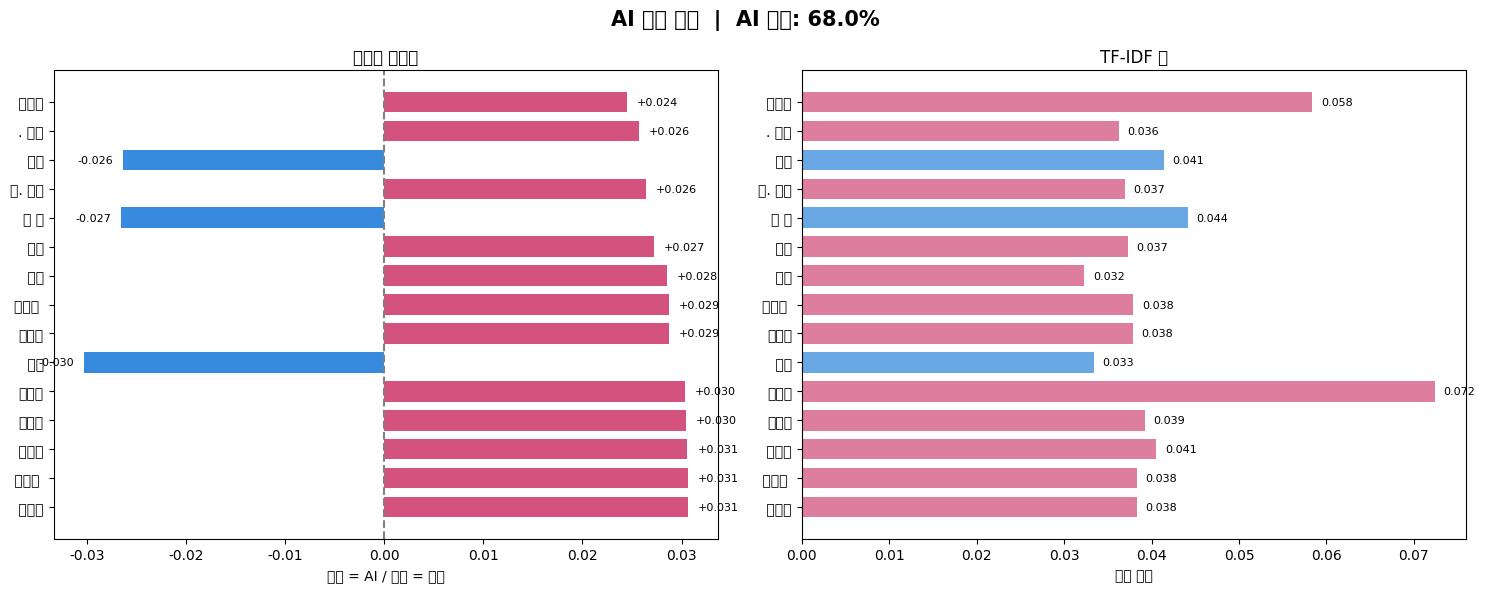
2-4. 실제 글로 테스트한 결과
모델 변경으로 인해 모델 테스트 코드도 수정.
1. 직접 쓴 글


2. 해당 주제를 기반으로 AI가 쓴 글

'S > [기록] 프로젝트 기록' 카테고리의 다른 글
| [기계학습] 심장병 분류 모델링 프로젝트 - 개선 (0) | 2026.06.03 |
|---|---|
| [Modeling] LDA, QDA, tSNE (0) | 2026.05.26 |
| [Modeling] SVM Support Vector Machine (0) | 2026.05.26 |
| [Modeling] Random Forest (0) | 2026.05.26 |
| [Modeling] Logistic Regression (0) | 2026.05.25 |